Extension tools
Apart from the main pipeline, we also offer some extention tools for results visualization and statistic analysis. This page tells you how to use them!
- 1. plot_paralog_heatmap.py
- 2. plot_recovery_heatmap_v2.py
- 3. RLWP.py
- 4. filter_seqs_by_length.py
- 5. filter_seqs_by_sample_and_locus_coverage.py
- 6. modified_phypartspiecharts.py
- 7. Fasta_formatter.py
- 8. rename_assembled_data.py
1. plot_paralog_heatmap.py
(1) Overview
Paralogs are homologous genes that arise from gene duplication within the same species. plot_paralog_heatmap.py is a Python script for analyzing and visualizing paralog distribution patterns across samples and loci. As a part of the HybSuite toolkit, it processes unaligned FASTA file for each locus to:
- Count paralogous sequences for each sample at each locus and generate a TSV format data table recording the counts.
- Generate heatmaps to visualize paralog distribution patterns, with auto-adjusted dimensions based on sample and locus counts.
- Support multi-threading for improved efficiency.
(2) Dependencies
- If you’ve already installed all HybSuite dependencies in
<conda_env>, activate it to run this script:
conda activate <conda_env>
- Otherwise, manually install the dependencies first:
pip install pandas seaborn matplotlib numpy
Key differences from HybPiper’s paralog heatmap plotting function
paralog_retriever:(1) Input format
hybpiper paralog_retriever: Requires the sample folders generated byhybpiper assemble.- This script: Accepts a folder containing FASTA files, making it applicable to a wider range of datasets (e.g., those including pre-assembled sequences).
(2) Visualization features
- Customizable heatmap colors.
- Option to display the paralog count for each sample–locus cell directly on the heatmap.
- Generates higher-quality, more publication-ready figures.
(3) Input file requirements
This script processes the following input files:
- (1) Input Directory (required, specified by
-i/--input_dir):
A directory containing multiple FASTA format files, each FASTA file represents a locus and contains sequences from multiple samples. Files should be named<locus_name>.fasta,<locus_name>_paralogs.fastaor<locus_name>_paralogs_all.fasta.
FASTA File Format Requirements:
- Sequence headers start with ‘>’
- Header format should be
>sample_name [other information]or simply>sample_name - Mutiple sequences in one sample in one locus are allowed.
For example:
>Sample1
ATGCTAGCTAGCTAGCTAGCTAGCTAGCTA
>Sample2
ATGCTAGCTATCGATCGATCGATCGATCGA
>Sample3
ATGCTCGATCGATCGATCGATCGATCGATC
NOTE:
If a sample has only one single sequence in one locus, then this sequence is the orthology one. If a single sample have multiple sequences in one locus, then these seuqences are putative paralogs.
The paralog sequence FASTA files retrieved by hybpiper paralog_retriever can directly be the input files for this script. For example, the 5942_paralogs_all.fasta in our dataset:
>Elaeagnus_angustifolia.main NODE_1_length_1285_cov_267.250828,Elaeagnus-pungens-Elaeagnus_pungens,0,201,98.51,(1),312,915
ACCTTCCTTGACCTCAAGACCGCACCACCCGAAACAGCTCGAGCCGTCGTTCACCGAGCCATCATTACAGACCTGCAGAACAAACGCCGTGGCACCGCCTCAACCCTTACCCGCGGTGAGGTTAGAGGTGGCGGAAAGAAGCCCTACCCACAAAAGAAAACGGGTAGGGCTCGACAGGGGTCCAAGAGAACTCCACTCCGGCCAGGTGGAGGAGTCGTCTTTGGGCCTAAGCCCAGAGATTGGAGCATCAAGATCAATAGAAAGGAGAAAAGGTTGGCGATTTCGACAGCAATGTCTAGTGCAGCTGCGAATACGATCGTGGTGGAGGATTTTTGGGACAATATGGATAAACCCAGGACGAAGGATTTTATAGCTGCTATGAAGAGGTGGGGTTTAAATCCACCGGGAGAGAAAGCTATGTTTATGATGGACGAAATTTCGGATAACGTGAGGCTTTCAAGTAGAAATATTCCGAAAGTGAAGGTTTTGACCCCGAGGACTTTGAATTTGTTTGATATTTTAAATGCGGATAAGTTGGTGCTTACCCCTGCTGCTGTGGATTACTTGAATGGACGTTATGGTGTTAATTATGAGGGTGAGAGT
>Elaeagnus_angustifolia.0 NODE_2_length_1266_cov_276.023549,Elaeagnus-pungens-Elaeagnus_pungens,2,201,89.95,(-1),301,898
CTTGATCTCAAAACAGCACCACCCGAAACTGCTCGAGCCGTCGTTCACCGAGCCATAATCACAGACCTCCAAAACAAACGCCGTGGGACTGCCTCAACCCTAACCCGTGGTGAGGTTAGAGGTGGTGGGAAAAAACCTTACCCACAAAAGAAAACGGGTCGGGCCCGACAAGGGTCCAAGAGAACTCCACTCCGTCCCGGTGGAGGTGTCGTTTTTGGTCCTAAGCCCAGAGATTGGACCATCAAGATCAATAGGAAGGAAAAGAGGTTGGCAATTTCGACAGCAATGGTTAGTGCTGCTACGAATACGATTGTGGTGGAGGATTTTGGGGACAAGTTTGAGAAACCCAAGACGAAGGAGTTCATAGAGGCAATGAAGAGGTGGGGTTTGGACCCACCGGAAGAGAAAGCTATGTTTTTGATGGAGGAGATATCTGATAATGTGAGGCTTTCGAGTAGAAATGTACCAAAAGTGAAGGTTTTGACACCAAGGACTTTGAATTTGTTTGATATTTTGAATGCTGATAAGTTGATTCTTTCCCCTGCTACTGTGGATTACTTGAATGCTCGATATGGGGCTAATTATGAGGGGGAGAAT
>Elaeagnus_macrophylla.main NODE_2_length_1269_cov_183.823826,Elaeagnus-pungens-Elaeagnus_pungens,0,201,88.06,(1),297,900
ACATACCTCGATCTCAAAACAGCACCACCCGAAACAGCTCGAGCCGTCGTTCACCGAGCCATAATCACAGACCTCCAAAACAAACGCCCTGGGACTGCCTCAACCCTTACCCGCGGTGAGGTTAGAGGTGGTGGAAAGAAACCTTACCCACAAAAGAAAACGGGTCGCGCTCGACAAGGGTCAAAAAGAACTCCACTCCGTCCAGGTGGAGGTGTCGTTTTTGGGCCTAAGCCCAGAGATTGGACCATCAAGATCAATAGGAAGGAAAAGAGGTTGGCAATTTCGACAGCAATGGTTAGTGCTGCTACGAATACGATTGTAGTGGAGCATTTTGGGGACAAGTTTGAGAAACCCAAGACGAAGGGGTTCATAGAGGCAATGAAGAGGTGGGGTTTGGACCCACCTGAAGTGAAAGCTATGTTTTTGATGGAGGAGATATCTGATAATGTGAGGCTTTCGAGTAGAAATGTACCAAAAGTGAAGGTTTTGACACCAAGGACTTTGAATTTGTTTGATATTTTGAATGCTGATAAGTTGATTCTTTCCCCTGCTACTGTGGATTACTTGAATGCTCGATATGGGGCAAATTATGAGGGTGAGAAT
...
- (2) Species List File: (Optional, specified by
-species_list)
If you want to analyze only specific species, you can provide a species list file:
Sample1
Sample2
Sample3
(4) Basic usage
python plot_paralog_heatmap.py \
    -i <input_dir> \
    -opr <counts.tsv> \
    -oph <heatmap.png> \
    [options] ...
- Required parameters in basic usage
-i/--input_dir
Directory containing FASTA files with paralogous sequences (formatted as<locus_name>_paralogs.fasta)- At least one output option must be specified:
-opr, --output_paralog_report
Generate a TSV file containing paralog counts-oph, --output_paralog_heatmap
Generate a heatmap visualization (format determined by file extension)
(5) Full parameters:
General options:
  -t THREADS, --threads THREADS
                        Number of threads to use for processing (default: 1)
  --species_list SPECIES_LIST
                        File containing list of species to include in the analysis (one species per line)
  --output_species_list OUTPUT_SPECIES_LIST
                        Output file to save the list of processed species

Heatmap customization options:
  --dpi DPI             DPI (dots per inch) for output image (default: 300)
  --fig_length FIG_LENGTH
                        Figure length in inches (default: auto-calculated based on number of loci)
  --fig_height FIG_HEIGHT
                        Figure height in inches (default: auto-calculated based on number of species)
  --sample_font SAMPLE_FONT
                        Font size for sample labels in points (default: 10)
  --gene_font GENE_FONT
                        Font size for gene labels in points (default: 10)
  --hide_xlabels        Hide x-axis labels (locus names)
  --hide_ylabels        Hide y-axis labels (sample names)
  --no_grid             Do not show grid lines in heatmap
  --color {black,blue,red,green,purple,orange,yellow,brown,pink}
                        Color scheme for heatmap gradient (default: black)
  --show_values         Show numerical values in heatmap cells (only for values >= 2)
  --grid_color GRID_COLOR
                        Color for grid lines in heatmap (default: grey)
  --add_markers         Add visual markers in cells (dots for 1s, diagonal lines for 0s)
(6) Output examples
- TSV Report (paralog_counts.tsv):
(use-opr, --output_paralog_reportto specify the output filename and directory.)
Species   gene1   gene2   gene3
Sample1   2       1       0
Sample2   1       1       1
Sample3   0       2       1
- Heatmap Visualization
The heatmap uses color intensity to represent the number of recovered sequences:- White: No sequences (0)
- Light color: Single sequence (1), representing single copy orthologs.
- Darker color: Multiple sequences (≥2), representing putative paralogs.
- For example, the following figure is the default output of our test dataset
Arabidopsis100.
You can find it in<output_dir>/02-All_paralogs/04-Filtered_paralog_reports_and_heatmap/Filtered_paralog_heatmap.pngafter running HybSuite by following our guide. In the HybSuite stage 2 pipeline, this script was applied to generate the heatmaps for original paralogs and filtered paralogs and by default,--show_valuesis used to display the specific numbers of recovered sequences in each locus of each sample.

- When running this script manually, the recovered sequence counts won’t display if you don’t use the
--show_valuesoption.:

- To clearly show the type of sequence in each locus of each sample, it is advisable to use
--add_markersplus--show_valueto add markers and numbers to the figure:X: No sequences (0)·: Single sequence (1), representing single copy orthologs.<number>: Multiple sequences (≥2), representing putative paralogs.
python plot_paralog_heatmap.py ... -add_markers --show_value

- Besides, you can also use
--colorto change a new color theme:
python plot_paralog_heatmap.py ... --color red

python plot_paralog_heatmap.py ... --color blue

NOTE: Our script only provides nine color themes, they are
black(default),red,blue,purple,green,orange,yellow,brownandpink.
(7) Use cases
- Paralog Distribution Analysis: Identify which species and genes tend to have more paralogs
- Data Quality Assessment: Evaluate completeness of sequencing and assembly
- Evolutionary Analysis: Study gene duplication events across different species
- Data Visualization: Generate high-quality visualizations for papers or reports
(8) Tips and tricks
- For large datasets, increase the thread count (-t parameter) to speed up processing
- If sample names are long, use a smaller sample font size (–sample_font)
- This script can adjust the image dimensions automatically (which might be best for visualization in many cases). You can also use
--fig_lengthand--fig_heightto manually adjust your image. - Use –show_values to display specific paralog counts directly on the heatmap (for counts ≥2)
2. plot_recovery_heatmap_v2.py
(1) Overview
plot_recovery_heatmap_v2.py visualizes sequence recovery across samples and loci. It generates heatmaps showing the percentage of sequence length recovered for each gene in each sample, relative to reference sequences.
It highlights:
- Well-recovered loci across samples
- Samples with poor overall recovery
- Recovery patterns indicating systematic biases
Key features:
- Calculates sequence lengths from FASTA files
- Generates comprehensive sequence length tables in TSV format
- Creates customizable heatmaps with multiple color schemes
- Supports comparison against mean or maximum reference lengths
- Offers extensive visualization options including value display and grid customization
- Provides multi-threading support for processing large datasets
- Support for interactive Plotly HTML output.
This script is the updated version of plot_recovery_heatmap.py. The initial version is still available but the updated one is more recommended to use. See the plot_recovery_heatmap.py manual for details.
(2) Dependencies
- If you’ve already installed all HybSuite dependencies in
<conda_env>, activate it to run this script:
conda activate <conda_env>
- Otherwise, manually install the dependencies first:
pip install biopython pandas seaborn matplotlib numpy plotly
The script requires:
- Python 3.6 or higher
- Biopython (for sequence parsing)
- NumPy and Pandas (for data manipulation)
- Matplotlib and Seaborn (for visualization) The script automatically checks for required packages and will provide clear error messages if any are missing.
(3) Input file requirements
Required input:
- Directory of FASTA files - Each file should contain sequences for a single locus across multiple samples
- Supported file extensions:
.fna,.fasta,.fa. - Each sequence header should start with the species/sample name (e.g.,
>species_name rest_of_header).
- Target sequence file - A single FASTA file containing reference sequences for all target loci
- Each sequence ID should include the locus name at the end, separated by a hyphen (e.g.,
>ref-locusnameA). - The script automatically detects whether references are nucleotide or protein sequences.
(4) Optional input:
- Species list file - A simple text file with one species name per line (
-s <FILE>) - If not provided, species names will be automatically extracted from the FASTA files
(5) Basic usage
The basic command requires only the input directory and reference file:
python plot_recovery_heatmap_v2.py -i /path/to/fasta_files -r /path/to/reference.fasta \
-output_heatmap /path/to/recovery_heatmap(without_suffix)
This will:
- Calculate sequence lengths for each sample and locus.
- Generate a
seq_lengths.tsvfile in the current directory. (use--output_seq_lengthsto change the output path). - Create a heatmap image named
recovery_heatmap.pngin the directory/path/to/.
(6) Example
If you have finished running our pipeline, open the directory 02-All_paralogs/03-Filtered_paralogs, which is one of the output directories of our example dataset Angiosperms353. Then you will find there are many FASTA files in it:
4471_paralogs_all.fasta
4527_paralogs_all.fasta
4691_paralogs_all.fasta
4724_paralogs_all.fasta
...
- Locus name
4471,4527,4691,4724… - Filename suffix:
_paralogs_all - Suffix:
.fasta
In that case:
- use the option
-i/--input_dirto specify the path to this directory; - use the option
-rto specify the path to the Angiosperms353 target file (locus names in target file must be corresponded with that in your input directory); - use the option
--filename_suffixto specify the filename suffix_paralogs_allto enable the script extract the locus name from the filename.
Run:
cd /path/to/02-paralogs/03-Filtered_paralogs/
python plot_recovery_heatmap_v2.py -i . -r /path/to/Target_file_Angiosperms353.fasta --filename_suffix "_paralogs_all" -output_heatmap ./recovery_heatmap.html -gw 0
Then you can obtain an interactive heatmap HTML file ./recovery_heatmap.html:
- The blue bars along with x- and y-axes indicate how many loci are recovered in each sample and how many samples each locus are recovered in, respectively.
- The color intensity of each cell indicates the proportion of gene length recovered for a given sample (y-axis) at a specific target locus (x-axis). When multiple sequences are recovered for a locus within a sample (putative paralogs), only the longest sequence is retained for visualization in the heatmap.
Now, let’s play with this interactive html file for fun and better effect!
- Choose the button “Sort by” as “Descending” to sort samples and loci on the heatmap from high to low recovery.
- Click on the “Plus” (+) and “Minus” (-) icons in the upper right corner to zoom in and out of the heatmap.
- Click on the “AutoScale” icon in the upper right corner to auto-scale the heatmap.
- Click the “Camera” (📷) icon in the upper right corner to download the current heatmap view as a PNG file.
- If some samples recover very few or no loci, we recommend replacing their data sources or increasing the value of
-seqs_min_loci_coverageto exclude these low-quality samples from downstream analyses.
(7) Full parameters
usage: plot_recovery_heatmap_v2.py [-h] -i INPUT_DIR -r REFERENCE [-s SPECIES_LIST] [--filename_suffix FILENAME_SUFFIX]
                                   [--output_species_list OUTPUT_SPECIES_LIST] [--output_heatmap OUTPUT_HEATMAP]
                                   [--output_seq_lengths OUTPUT_SEQ_LENGTHS] [-t THREADS]
                                   [--color {viridis,magma,inferno,plasma,cividis,turbo,purple,blue,green,black}] [--title TITLE]
                                   [--use_max] [--xlabel XLABEL] [--ylabel YLABEL] [-gw GRID_WIDTH]

plot_recovery_heatmap_v2.py - A visualization tool in HybSuite

This script is a component of the HybSuite toolkit, designed for visualizing sequence recovery
rates across different taxa and loci. It generates heatmaps that display the percentage of
sequence length recovered for each gene in each taxon, relative to either the average or
maximum length of reference sequences.

Key features:
1. Calculates sequence lengths and generates a seq_lengths.tsv file
2. Calculates the percentage length recovered relative to reference sequences
3. Generates customizable heatmaps showing recovery rates
4. Supports both average and maximum reference length comparisons
5. Offers flexible visualization options

Both the seq_lengths.tsv file and heatmap generation are optional outputs.
Part of HybSuite

optional arguments:
  -h, --help            show this help message and exit
  -i INPUT_DIR, --input_dir INPUT_DIR
                        Directory containing FASTA files for each locus
  -r REFERENCE, --ref REFERENCE
                        Target sequence file (FASTA format)
  -s SPECIES_LIST, --species_list SPECIES_LIST
                        File containing list of species names (one per line). If not provided, species names will be extracted from FASTA files
  --filename_suffix FILENAME_SUFFIX
                        Suffix(es) to remove from input FASTA filenames to get locus names. Multiple suffixes can be separated by commas. Example: "_paralogs_all". If not specified, the input filenames will be recognized as loci names.
  --output_species_list OUTPUT_SPECIES_LIST, -osp OUTPUT_SPECIES_LIST
                        Output file for extracted species list (when species_list is not provided)
  --output_heatmap OUTPUT_HEATMAP, -oh OUTPUT_HEATMAP
                        Output path and filename for the heatmap (default: recovery_heatmap.html). Should end with .html extension.
  --output_seq_lengths OUTPUT_SEQ_LENGTHS, -osl OUTPUT_SEQ_LENGTHS
                        Output file for sequence lengths (TSV format). If not provided, sequence lengths will be written to seq_lengths.tsv in current directory
  -t THREADS, --threads THREADS
                        Number of threads to use (default: 1)
  --color {viridis,magma,inferno,plasma,cividis,turbo,purple,blue,green,black}
                        Color scheme for the HTML heatmap (default: blue). Available options: viridis, magma, inferno, plasma, cividis, turbo, purple, blue, green, black
  --title TITLE         Main title of the heatmap (default: "Percentage length recovery for each gene")
  --use_max             Use maximum length instead of average length from reference sequences
  --xlabel XLABEL       X-axis label (default: "Locus")
  --ylabel YLABEL       Y-axis label (default: "Sample")
  -gw GRID_WIDTH, --grid_width GRID_WIDTH
                        The value of grid width of the heatmap, recommended to set as "0" when the locus number is huge (default: 0.5)
3. RLWP.py
(1) Overview
RLWP.py (Remove Loci With Paralogs) is a Python script within the HybSuite toolkit designed to filter out genetic loci with excessive paralog occurrences. Paralogs are gene copies that arise from gene duplication events and can complicate phylogenetic analyses. This tool identifies and removes loci that exceed a user-defined threshold of paralog presence across samples, helping to improve the quality of downstream analyses by maintaining only single-copy orthologous markers.
Key features:
- Filters loci based on paralog occurrence statistics
- Supports multi-threading for improved performance
- Provides detailed logging and reporting
- Offers in-place filtering or non-destructive output to a separate directory
- Works with various sequence file formats (suffix can be
FASTA,FNA,fasta,fa)
(2) Dependencies
- If you’ve already installed all HybSuite dependencies in
<conda1_env>, activate it to run this script:
conda activate <conda1_env>
- Otherwise, manually install the dependencies first:
pip install biopython pandas
(3) Input file requirements
RLWP.py requires two main types of input:
- A directory containing sequence files: A directory containing nucleotide sequence files in FASTA format (.fa, .fasta, .fna, .fas or their uppercase variants). Each file should represent one locus.
- Paralog statistics file: A tab-separated values (TSV) file containing paralog counts per sample for each locus.
0: No any sequence is recovered in this loci of the sample.1: The only recovered sequence in this loci of the sample is a single-copy orthology sequence.- more than
1: Putative paralogs exist in this loci of the sample.
This file should have:
- Sample IDs in the first column
- Locus names as column headers
- Values representing the number of paralogs found for each sample-locus combination
NOTE: This file can be generated by running
plot_paralog_heatmap.py(with the option-oph, see here)
Example paralog statistics file format:
Sample  Locus1  Locus2  Locus3
sample1 1       2       1
sample2 1       1       3
sample3 2       1       1
(4) Basic usage
- Remove loci where >2 samples show putative paralogs:
python RLWP.py -i input_directory -p paralog_statistics.tsv -s 2 -or deletion_report.tsv
Required parameters:
-i, --input_dir: Directory containing sequence files-p, --paralog_heatma: Path to paralog statistics file (TSV format)-s, --samples_threshold: Minimum number of samples with paralogs to trigger locus removal-or, --output_report: Path for saving the deletion report
Optional parameters:
-o, --output_dir: Optional directory to output filtered files (preserves originals)-t, --threads: Number of threads to use for parallel processing (default: 1)
(5) Output examples
Tips and tricks
- Choosing the Right Threshold: Start with a conservative threshold (e.g., 5% of your total samples) and adjust based on your dataset characteristics.
- Non-destructive Workflow: Use the
-ooption to create a filtered copy of your data without modifying original files:
python RLWP.py -i <input_directory> -p paralog_reports.tsv -s 3 -o filtered_data
Start with a conservative threshold: (e.g., 5% of your total samples) and adjust based on your dataset characteristics.
Performance Optimization: For large datasets, increase thread count to speed up processing
4. filter_seqs_by_length.py
(1) Overview
filter_seqs_by_length.pyis a Python script within the HybSuite package that filters DNA sequences based on length criteria. It allows filtering sequences using absolute minimum length or relative length compared to reference sequences.- It is particularly useful for removing short, potentially truncated sequences before downstream analyses, helping to ensure high-quality datasets for phylogenomic analysis.
- It processes multiple FASTA files in parallel, reference file can be DNA or protein sequences.
- It provides detailed logging and reporting of filtered sequences, making it easy to track what was removed and why.
(2) Dependencies
Key dependencies:
- BioPython: For sequence handling
- Pandas: For reporting and data manipulation
- Python 3.6+: For pathlib and f-string support
If you’ve already installed all HybSuite dependencies in
<conda1_env>, activate it to run this script:
conda activate <conda1_env>
- Otherwise, manually install the dependencies first:
pip install biopython pandas
(3) Input file requirements
filter_seqs_by_length.py requires two types of input:
- A directory containing sequence files in FASTA format:
- Supported extensions: .fa, .fasta, .fna, .fas (case-insensitive)
- Each file is assumed to contain sequences from a single locus
- Filename determines locus ID (e.g., the locus name of
GeneName.fastaisGeneName)
- Reference Sequences
- The format of reference sequences is as the same as the requirement of HybSuite main program (here to check).
(4) Basic usage
- Filter sequences by absolute minimum length:
python filter_seqs_by_length.py -i input_directory --min_length 300
- Filter using reference sequences to according to length ratio (compared to mean length or maximum length of each locus in reference file):
python filter_seqs_by_length.py -i input_directory -r reference.fasta --mean_length_ratio 0.7
- Combine multiple criteria to filter:
python filter_seqs_by_length.py -i input_directory -r reference.fasta \
    --min_length 200 --mean_length_ratio 0.6 --max_length_ratio 0.5
- Save output to a different directory rather than modifing original files:
python filter_seqs_by_length.py -i input_directory --output_dir filtered_sequences
- Generate report of removed sequences:
python filter_seqs_by_length.py -i input_directory -r reference.fasta \
    --mean_length_ratio 0.7 --output_report removed_seqs.tsv
(5) Output examples
Filtered FASTA Files
Filtered sequences are written either:
- To the original files (overwriting them)
- To a new directory if
--output_diris specified
Removed Sequences Report
When using --output_report, a TSV file is created with details of removed sequences:
| File | Sequence_ID | Length | Mean_Length_Ratio | Max_Length_Ratio |
|---|---|---|---|---|
| gene1.fasta | Sample1_gene1 | 125 | 0.435 | 0.391 |
| gene2.fasta | Sample3_gene2 | 78 | 0.213 | 0.185 |
(6) Use cases
Cleaning Assembled Data
- Remove truncated sequences resulting from poor assembled and captured sequences:
python filter_seqs_by_length.py -i captured_exons -r reference.fasta \
    --mean_length_ratio 0.3 --output_report removed_sequences.tsv
Tips and Tricks
- Locus Identification: Ensure filenames match locus IDs in reference sequences (part after last hyphen).
- Preserving Originals: Always use
--output_dirwhen testing filtering parameters to avoid overwriting original files. - Speed Optimization: Set
-tto match available CPU cores for maximum performance. - Multiple Filters: Combining
--min_lengthwith ratio-based filters creates more stringent filtering. - Protein Sequences: The script automatically detects the type of reference file (DNA/protein) and adjusts length calculations appropriately.
5. filter_seqs_by_sample_and_locus_coverage.py
(1) Overview
filter_sequences_by_sample_and_locus_coverage.py is a Python script designed to remove samples with low loci coverage and loci with low sample coverage in phylogenomic dataset based on user-defined threshold.
This tool can:
- Filter samples and loci based on minimum coverage thresholds
- Generate reports of removed samples and loci
- Process files in parallel to improve performance
(2) Dependencies
Key dependencies:
- BioPython: For sequence handling
- Pandas: For reporting and data manipulation
- Python 3.6+: For pathlib and f-string support
If you’ve already installed all HybSuite dependencies in
<conda1_env>, activate it to run this script:
conda activate <conda1_env>
- Otherwise, manually install the dependencies first:
pip install biopython pandas
(3) Input file requirements
The tool processes FASTA files in a directory with the following requirements:
- A directory containing sequence files in FASTA format:
- Supported extensions:
.fa,.fasta,.fna,.fas,FNA(case-insensitive). - Each file is assumed to contain sequences from a single locus.
- Filename determines locus ID (e.g., the locus name of
GeneName.fastaisGeneName).
(4) Basic usage
python filter_seqs_by_sample_and_locus_coverage.py -i input_directory --min_sample_coverage 0.5 --min_locus_coverage 0.7
Required parameters
-i, --input: Directory containing FASTA files.--min_sample_coverage: Minimum sample coverage ratio (0-1) for each locus (default: 0.0)- `–min_locus_coverage: Minimum locus coverage ratio (0-1) for each sample (default: 0.0)
Optional parameters
-o, --output_dir: Directory for filtered sequences (if not specified, original files are modified)-t, --threads: Number of threads to use (default: 1)--removed_samples_info: Output TSV file for removed samples coverage information--removed_loci_info: Output TSV file for removed loci coverage information
(5) Output examples
- Example of
removed_samples.tsv(specified by--removed_samples_info):
Sample  Locus_Coverage
Species1    0.45
Species2    0.32
- Example of
removed_loci.tsv(specified by--removed_loci_info):
Locus   Sample_Coverage
Locus1  0.38
Locus2  0.42
(6) Use cases
- The following running codes remove loci that appear in less than 60% of samples and samples that have less than 50% of loci.
python filter_seqs_by_sample_and_locus_coverage.py \
-i assembled_loci/ -o filtered_loci/ \
--min_sample_coverage 0.6 --min_locus_coverage 0.5 \
--removed_samples_info removed_samples.tsv --removed_loci_info removed_loci.tsv
(7) Tips and tricks
- Choosing Coverage Thresholds: Start with lower thresholds (e.g., 0.3-0.5) and gradually increase until you achieve the desired balance between data completeness and taxon/locus sampling.
- Preserving Original Files: Always use the
-ooption to output to a new directory when experimenting with different thresholds. - Removing Problematic Samples Only: Set
--min_locus_coveragewithout setting--min_sample_coverageto filter out only low-coverage samples while keeping all loci. - Tracking Removed Data: Always use the
--removed_samples_infoand--removed_loci_infooptions to keep records of what was filtered out for documentation and troubleshooting. - Performance Optimization: Use the
-toption with a value close to your CPU core count for faster processing of large datasets.
6. modified_phypartspiecharts.py
(1) Overview
modified_phypartspiecharts.pyis an enhanced version of the originalphypartspiecharts.pyscript, specifically designed to visualize gene tree conflict patterns. Based on the method published by Smith et al. in 2015, this script generates pie charts to display gene tree concordance and conflict at phylogenetic tree nodes.
(2) Basic usage
The basic usage of modified_phypartspiecharts.py is nearly as the same as that of phypartspiecharts.py. The only difference is that users have to use --output to specify the path and filename of the output visiualization results when running modified_phypartspiecharts.py, rather than --svg_name in phypartspiecharts.py.
python modified_phypartspiecharts.py \
species_tree phyparts_prefix num_genes ...
- Required Parameters in basic usage
species_tree: Path to species tree file (Newick format)phyparts_root: Prefix of PhyParts output filesnum_genes: Total number of gene trees
(3) Extended functionality
Compared to the original version, modified_phypartspiecharts.py offers the following extended functionality:
a. Running Efficiency Control
- Multithreading Support: Use
-nt/--threads <NUM>for multithreaded processing, significantly improving speed for large datasets
b. Output Files Control
Support for SVG and PDF format outputs: use
--output <output_file>and specify your outputfile with the extension.pdfor.svg.Additional Statistical Output: use
--statparameter to export detailed node statistics to TSV files.
The detailed node statistics table generated by--statparameter contains the following columns:Node: Node IDSupport(blue): Number of genes supporting the species treeTopConflict(green): Number of genes with main conflictOtherConflict(red): Number of genes with other conflictNoSignal(gray): Number of genes with no signalSupport/Total_Ratio: Ratio of supporting to conflicting genes
The file also includes the average ratios for internal nodes including
Support/Total Ratio,Conflict/Total Ratio,NoSignal/Total Ratio,Support/Signal_RatioandConflict/Signal_Ratio.For example:
Node	Support(blue)	TopConflict(green)	OtherConflict(red)	NoSignal(gray)	Support/Total_Ratio	Conflict/Total_Ratio	NoSignal/Total_Ratio	Support/Signal_Ratio	Conflict/Signal_Ratio
0	85	0	0	157	0.3512	0.0000	0.6488	1.0000	0.0000
1	202	7	31	2	0.8347	0.1570	0.0083	0.8417	0.1583
2	135	41	59	7	0.5579	0.4132	0.0289	0.5745	0.4255
3	205	6	20	11	0.8471	0.1074	0.0455	0.8874	0.1126
4	123	22	91	6	0.5083	0.4669	0.0248	0.5212	0.4788
5	164	33	36	9	0.6777	0.2851	0.0372	0.7039	0.2961
6	190	18	29	5	0.7851	0.1942	0.0207	0.8017	0.1983
7	91	35	112	4	0.3760	0.6074	0.0165	0.3824	0.6176
8	129	18	86	9	0.5331	0.4298	0.0372	0.5536	0.4464

Average ratios for internal nodes only:
Support/Total Ratio: 0.6079
Conflict/Total Ratio: 0.2957
NoSignal/Total Ratio: 0.0964
Support/Signal Ratio: 0.6963
Conflict/Signal Ratio: 0.3037
c. Extended Visualization Functionality
- Support for controlling whether taxonomic names use italic font: use
--no_italic - Support for flexible number displayed on branches: use
--show_num_mode <NUM> - Support for controlling tree branch width display: use
--line_width <NUM> - Support for controlling pie chart size: use
--pie_size <NUM> - Support for controlling leaf node label size: use
--tip_size <NUM> - Support for controlling node number label size: use
--number_size <NUM> - Support for circular, cladogram, and phylogram display types: use
--tree_type <circular|cladogram>
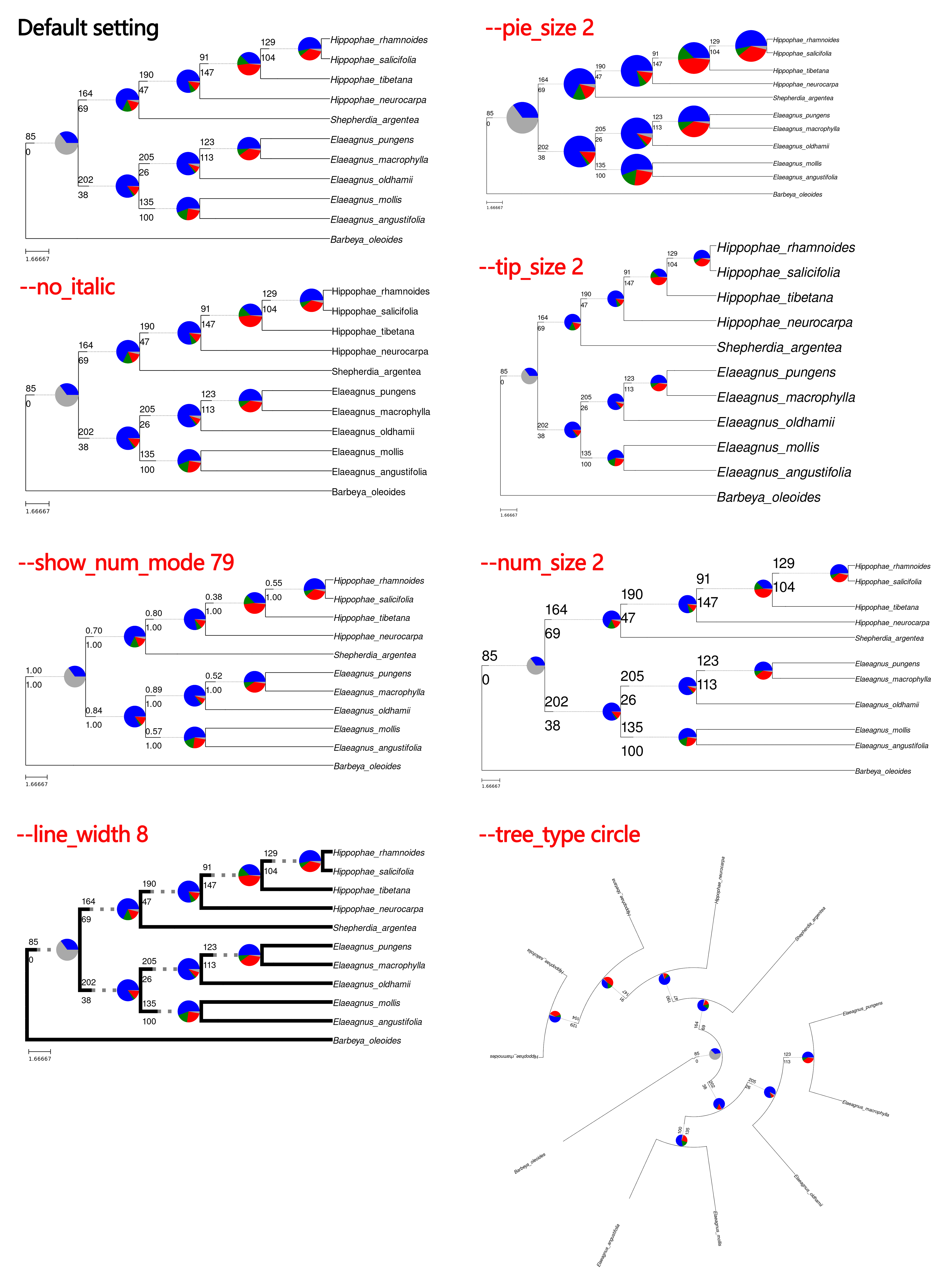
(4) Full Options
options:
  -h, --help            show this help message and exit
  --taxon_subst TAXON_SUBST
                        Comma-delimited file to translate tip names.
  --output OUTPUT       Output filename with extension (.svg or .pdf)
  --output_node_tree    Generate an additional tree file with '_nodes' suffix showing:
                        - All node identifiers in the tree
                        - No pie charts
                        - No numerical annotations
  --no_ladderize        Don't ladderize tree
  --to_csv              Export data to CSV
  --tree_type {circle,cladogram,phylo}
                        Tree visualization type (cladogram or circle, default: cladogram)
  --line_width VT_LINE_WIDTH
                        Width of tree branches (default: 0)
  --no_italic           Display species names in normal font style (default: italic)
  --tip_size TIP_SIZE_FACTOR
                        Scale factor for tip label font size (default: 1.0)
  --number_size NUMBER_SIZE_FACTOR
                        Scale factor for gene tree count font size (default: 1.0)
  --show_num_mode SHOW_NUM_MODE
                        Control what numbers to show on branches (specify 0-2 digits):
                        0: Hide all numbers
                        1: Number of genes supporting species tree (blue)
                        2: Number of genes conflicting with species tree (red+green)
                        3: Number of genes with no signal (gray)
                        4: Proportion of supporting genes (blue/total)
                        5: Proportion of conflicting genes ((red+green)/total)
                        6: Proportion of no signal genes (gray/total)
                        7: Ratio of supporting to all signal genes (blue/(blue+red+green))
                        8: Ratio of conflicting to all signal genes (red+green/(blue+red+green))
                        9: Original node support values from the input tree
                        Example: --show_num_mode 0  (hide all numbers)
                                --show_num_mode 1  (show only support number)
                                --show_num_mode 12 (default, show support and conflict numbers)
                                --show_num_mode 47 (show support number and support/conflict ratio)
                                --show_num_mode 9  (show original node support values)
  --pie_size PIE_SIZE_FACTOR
                        Scale factor for pie chart size (default: 1.0)
  --stat STAT_OUTPUT    Output file path for node statistics (TSV format)
  -nt THREADS, --threads THREADS
                        Number of threads to use (default: 1)
Citation
If using this tool, please cite:
- Original
phypartspiecharts.py: https://github.com/mossmatters/MJPythonNotebooks/blob/master/phypartspiecharts.py
7. Fasta_formatter.py
(1) Overview
Fasta_formatter.py is a Python script for reformatting FASTA sequences into either interleaved (60 characters per line) or single-line format. It supports multi-threading for faster processing of large files.
(2) Dependencies
- If you’ve already installed all HybSuite dependencies in
<conda_env>, activate it to run this script:
conda activate <conda_env>
- Otherwise, manually install the dependencies first:
pip install pathlib concurrent.futures
(3) Basic usage
python Fasta_formatter.py \
    -i <input_fasta> \
    -o <output_fasta> \
    --inter|--single \
    [-nt <threads>]
Required parameters:
-i/--input: Input FASTA file-o/--output: Output file path--inter: Output in interleaved format (60 characters per line)--single: Output in single-line format
Optional parameters:
-nt/--threads: Number of threads (default: 1)
(4) Example
Convert a FASTA file to interleaved format with 4 threads:
python Fasta_formatter.py -i sequences.fasta -o sequences_formatted.fasta --inter -nt 4
Convert to single-line format:
python Fasta_formatter.py -i sequences.fasta -o sequences_singleline.fasta --single
(5) Use cases
- Data preprocessing: Prepare sequences for downstream analysis tools that require specific FASTA formatting
- File standardization: Convert between different FASTA formats for compatibility
- Large file processing: Use multi-threading to speed up formatting of big datasets
8. rename_assembled_data.py
(1) Overview
rename_assembled_data.py is a python script in the HybSuite package designed to handle batch renaming operations for assembled data directories produced in the HybSuite stage 2 and their contents. It provides a comprehensive solution for renaming directories, files, and file contents while maintaining data integrity and consistency.
Key features:
- Recursively renames directory structures, file names, and file contents
- Handles potential naming conflicts safely
- Supports both single directory and batch renaming operations
(2) Basic usage
Single directory renaming
To rename a single directory and all its contents:
python rename_assembled_data.py -i /path/to/directory -n new_name
Parameters:
-i, --input: Path to the directory you want to rename-n, --new_name: The new name to replace the old name
Example:
python rename_assembled_data.py -i ./sample_001 -n sample_002
Batch renaming
For batch renaming multiple directories, create a tab-delimited file containing old and new name pairs:
python rename_assembled_data.py --rename_list path/to/rename_list.txt -p /path/to/parent_directory
Parameters:
--rename_list: Path to a tab-delimited file containing old_name and new_name pairs-p, --parent_dir: Path to the parent directory containing all the folders to be processed
The rename list file should be formatted as follows (tab-delimited):
old_name1   new_name1
old_name2   new_name2
old_name3   new_name3
Example:
python rename_assembled_data.py --rename_list rename_pairs.txt -p ./assembled_data
The script will:
- Process each directory listed in the rename file
- Rename all matching files and directories within each target directory
- Replace matching content within files
- Provide a summary of successful and failed operations
Note: The script includes safety checks and will skip operations that might cause conflicts or data loss.
Feedback
Was this page helpful?
Glad to hear it! Please tell us how we can improve.
Sorry to hear that. Please tell us how we can improve.